OCR Solutions for Document Processing
Exploring various OCR techniques and best practices for building robust document processing systems with Tesseract.

Table of contents
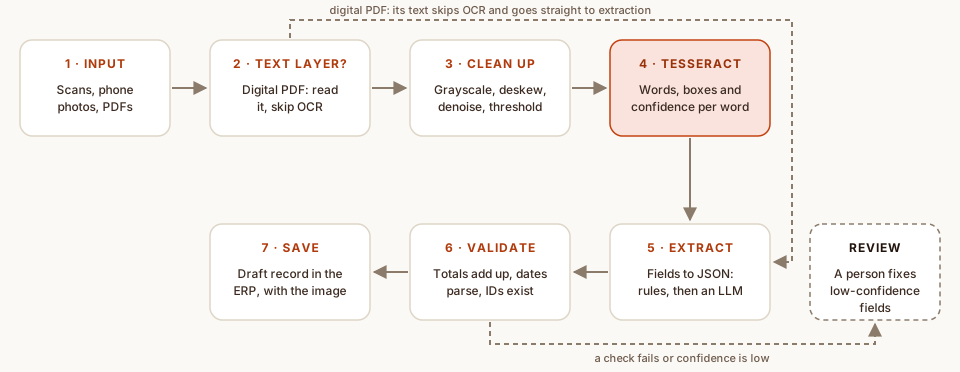
Most businesses I work with still run on paper somewhere: supplier invoices, delivery challans, national ID cards, handwritten forms that someone retypes into the ERP every morning. OCR promises to remove that typing. In practice, reading the text is maybe a third of the job. The rest is getting a clean image in, checking what comes out, and deciding what happens when the machine isn’t sure.
This post covers how I build that pipeline around Tesseract, the open-source OCR engine, in Python. Tesseract is free, runs on your own server so documents never leave it, and is very good on clean printed text. It is not magic on a crumpled photo, which is exactly why the steps around it matter.
Step one: maybe you don’t need OCR
Many PDFs that arrive by email were generated by software and already contain real text. Reading that text layer is instant and exact, so check for it first and only fall back to OCR for scans.
import fitz  # PyMuPDF

def pdf_text(path: str) -> str | None:
    """The PDF's embedded text, or None if it is a scan."""
    with fitz.open(path) as doc:
        text = "".join(page.get_text() for page in doc)
    return text if len(text.strip()) > 50 else None
Clean the image before you read it
Tesseract was built for printed pages: dark text on a light, even background, at around 300 DPI. Phone photos break every part of that. They are tilted, shadowed, low-contrast and often small. A few OpenCV steps bring them much closer to what the engine expects:
- Grayscale. Colour adds nothing for text and only adds noise.
- Upscale small images. Characters that are only a few pixels tall are where most misreads come from.
- Denoise. Removes the speckle from cheap scanners and JPEG compression.
- Adaptive threshold. Turns the page into black and white locally, so a shadow across half the page doesn’t wipe out the text inside it.
- Fix the rotation. image_to_osd tells you if a page is upside down or sideways; a small tilt can be measured from the text lines and rotated back.
import cv2
import numpy as np

def clean(path: str) -> np.ndarray:
    img = cv2.imread(path)
    gray = cv2.cvtColor(img, cv2.COLOR_BGR2GRAY)
    if gray.shape[1] < 1800:  # small photo: scale it up first
        gray = cv2.resize(gray, None, fx=2, fy=2, interpolation=cv2.INTER_CUBIC)
    gray = cv2.fastNlMeansDenoising(gray, h=15)
    return cv2.adaptiveThreshold(
        gray, 255, cv2.ADAPTIVE_THRESH_GAUSSIAN_C, cv2.THRESH_BINARY, 31, 15
    )
Tell Tesseract what it is looking at
The page segmentation mode (--psm) tells Tesseract what layout to expect, and choosing the right one often matters more than any other setting:
| Mode | Layout | Good for |
|---|---|---|
| --psm 3 | Fully automatic (the default) | Ordinary pages and letters |
| --psm 4 | One column of text of varying sizes | Invoices and statements |
| --psm 6 | A single uniform block of text | Cropped paragraphs and table cells |
| --psm 7 | A single line | ID numbers, amounts, plate numbers |
| --psm 11 | Sparse text, in no particular order | Receipts and forms with scattered fields |
Language matters too. Tesseract ships trained data for over a hundred languages, including Bangla, and -l eng+ben reads documents that mix both. Finally, ask for word-level data instead of a plain string. You get each word’s position and a confidence score, which the rest of the pipeline depends on.
import pytesseract
from pytesseract import Output

def read_words(img, lang: str = "eng", psm: int = 4) -> list[tuple[str, float]]:
    data = pytesseract.image_to_data(
        img, lang=lang, config=f"--oem 1 --psm {psm}", output_type=Output.DICT
    )
    return [
        (word, float(conf))
        for word, conf in zip(data["text"], data["conf"])
        if word.strip() and float(conf) >= 0  # -1 marks layout rows, not words
    ]
From text to fields
Raw text isn’t useful to an ERP; an invoice number, a date, a supplier and line totals are. I extract in two passes. Rules come first: regular expressions for things with a fixed shape, such as dates, amounts and ID numbers, and the positions from image_to_data for fields that always sit in the same place on a known form. Whatever the rules can’t find goes to a language model, which receives the OCR text and must answer in a fixed JSON schema. The model is good at messy layouts; the rules are fast, free and never make things up.
Check everything, then let a person decide
The step that makes OCR trustworthy is validation. Every extracted document is checked before it touches the ERP:
- Do the line totals add up to the invoice total?
- Does the date parse, and is it plausible (not next year, not ten years ago)?
- Does the supplier, customer or employee ID exist in the ERP?
- Is any field built from words with low OCR confidence?
If everything passes, the document becomes a draft record with the original image attached. If anything fails, it goes to a review screen with the doubtful fields highlighted next to the image, so a person fixes two fields instead of typing twenty. Over time the review queue also tells you which suppliers or forms need a better rule.
When Tesseract isn’t enough
Tesseract struggles with handwriting, dense tables and badly lit photos. For those, cloud document services such as Google Document AI, AWS Textract or Azure Document Intelligence, or a vision-capable language model, can read far more. They cost money per page and send documents off your server, so I use them as a fallback for the pages Tesseract can’t handle, not as the first step.
Takeaways
- Check for a text layer first. The best OCR is the one you don’t need to run.
- Preprocessing does more for accuracy than any engine setting.
- Choose the page segmentation mode for the layout, and keep word confidences.
- Validate every field, and send low-confidence documents to a person rather than guessing.

Written by Omor Al Tanim
Newsletter
Enjoyed this? Get the next one by email
A short email when I publish something new on AI agents, ERP automation or research. No spam; unsubscribe in one click.
More from Omor Al Tanim
 In Research by Omor Al TanimSep 28, 2026Pinned
DeepDse: Predicting the Dhaka Stock Exchange with Transformers, LSTMs and GRUs
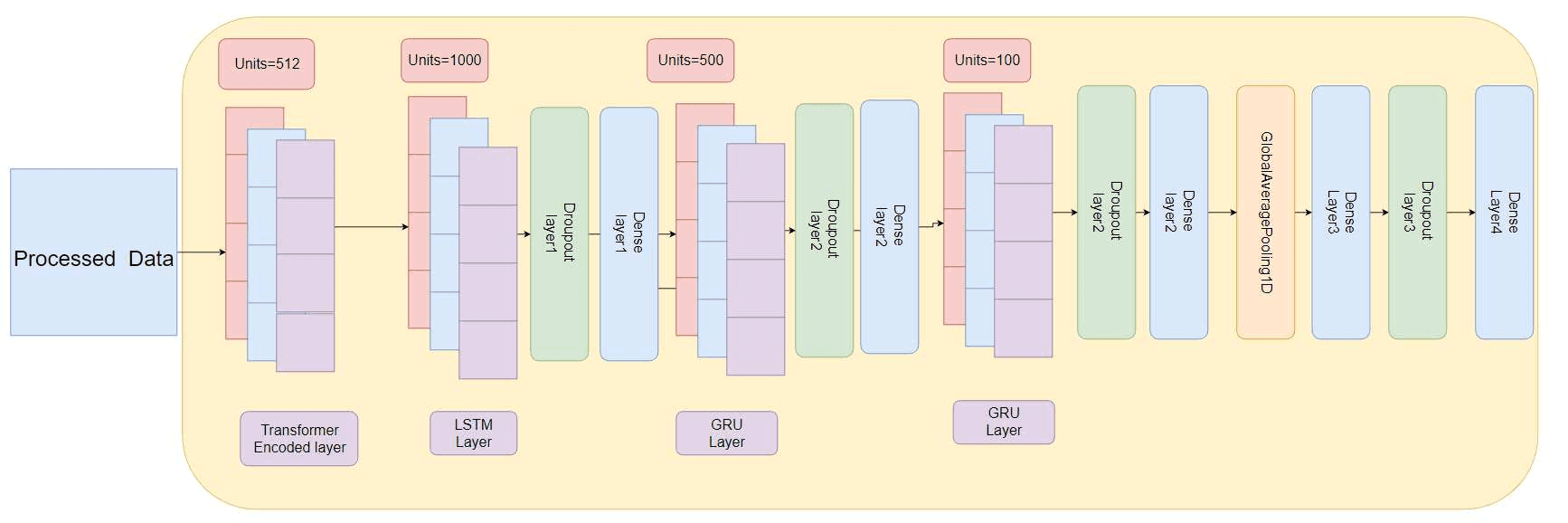
How we combined a Transformer encoder with LSTM and GRU layers, added gold, oil and USD prices as inputs, and got the lowest error on all 11 DSE stocks we tested.
- In Research by Omor Al TanimSep 28, 2026
LSTM + GARCH + Regression: A Hybrid Model for Bangladesh’s Stock Market
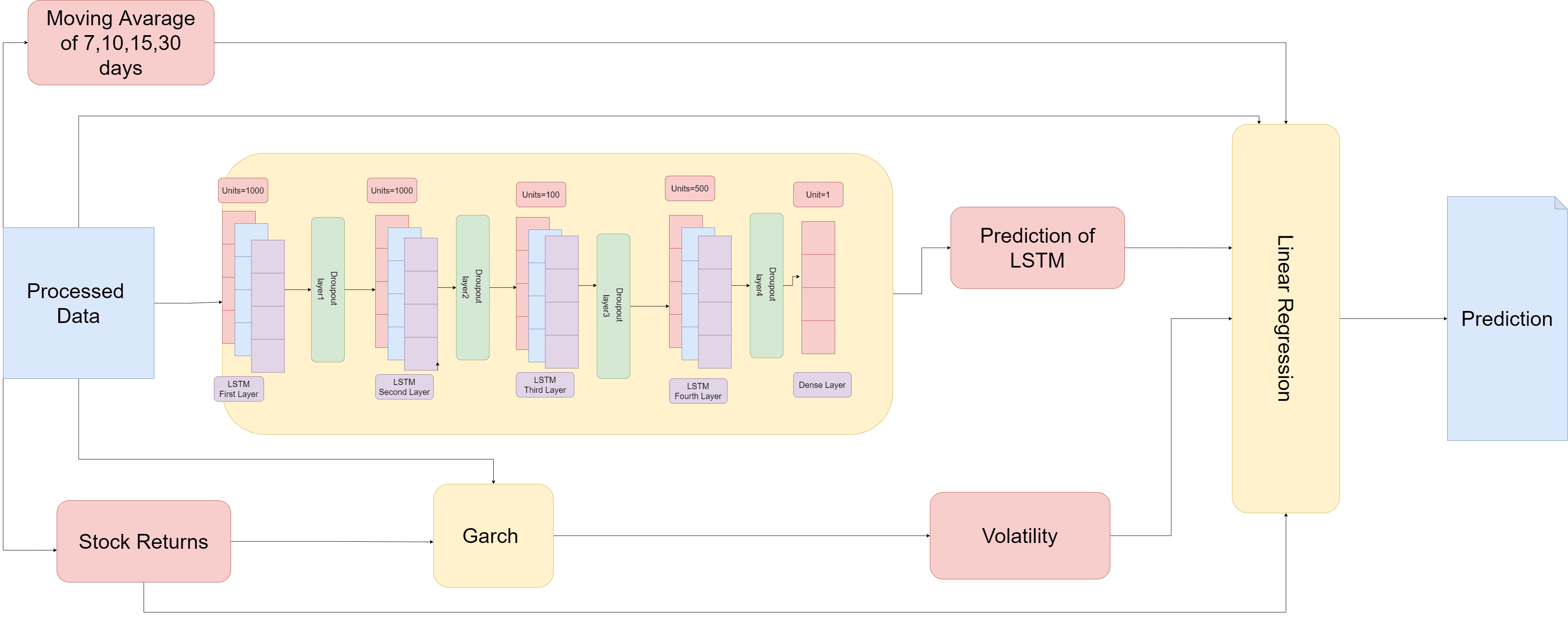
Why we split stock prediction across three models (a stacked LSTM for price, GARCH for volatility, and a linear regression to combine them) and how that roughly halved the error.
- In AI/ML by Omor Al TanimJan 15, 2025
Building Multi-Agent Systems with Semantic Kernel
A deep dive into creating intelligent multi-agent systems using Microsoft Semantic Kernel for orchestrating complex AI workflows.
Comments (0)
Comments are checked by AI before they appear. Read the rules
Loading comments…